EmbroideryConnect device
A separate EmbroideryConnect device is needed for each embroidery machine on the network. Designs can be ‘pushed’ to a named device or ‘pulled’ via barcode reader at each machine.
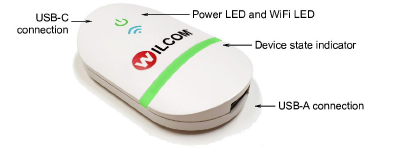
Device features
Device features are summarized below:
| Item | Description |
|---|---|
| EmbroideryConnect device | The device itself is small and compact. It can plug directly into an embroidery machine USB port or via USB extender cable. |
| USB-C connection | USB-C connection at top to connect device to PC or embroidery machine. |
| USB-A connection | Separate USB-A input port for USB barcode reader. |
| Device state indicator | The device displays basic status information. See below for details. |
| Power from USB | No separate power supply needed – power is drawn from USB port. |
TIP
The EC device comes with 3M mounting strips to attach it to the target machine.
EC device states
The EC device indicates various devices states. The following table explains the color coding…
| When… | Status light | Status | | --------------------------- | --------------- | ------------------------------------------------------------ | --- | | Attaching device to machine | Solid green | Device is running smoothly so machines can access designs. | | Scanning barcode | Flashing orange | Barcode scan failed. Scanned file not found in design queue. | | | Flashing purple | Device cannot connect to EmbroideryHub for design request. | | | Sending design to device | Flashing yellow | Device is unmounted. | | | Flashing orange | Sent file already exists on device. | | | | Flashing red | Error occurred. | |