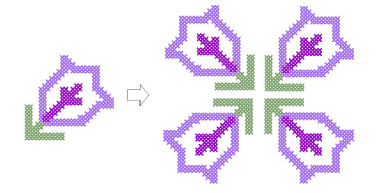
Rotate cross stitch blocks
 | Use Edit > Rotate Selection to rotate selected stitches. Click to rotate clockwise. Right-click to rotate counter-clockwise. |
|---|
You can rotate blocks of cross stitches in a clockwise or counter-clockwise direction. Duplicate and rotate blocks of stitches to make patterns.
To rotate blocks of cross stitches...
Select the stitch block to rotate.
Click the Rotate Selection icon.