Make objects the same size
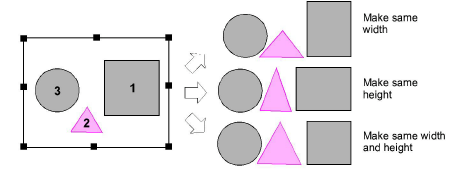
 | Click Arrange > Make Same Width to scale an object or design to the same width as a reference object. |
|---|---|
 | Click Arrange > Make Same Height to scale an object or design to the same height as a reference object. |
 | Click Arrange > Make Same Width and Height to scale an object or design to the same size as a reference object. |
You can scale objects to the same size as a reference object. Resize height or width or both.
To make objects the same size...
Select the objects to resize.
Select the object that is the size you require.
Click a sizing tool or select Arrange > Make Same Size > ...
Note
Objects are resized with reference to the last object selected. If all objects are selected by using Ctrl+A or a selection marquee, they are resized with reference to the last object in the sequence.